Nofrills Compass1.13
Publisher Description
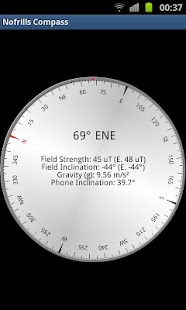
Nofrills Compass is a professional compass.
** NOTE: For this to work your device must have magnetic sensor built in **
To use it, you try use any of the following methods -
1. Rest it on your palm as the device would rest on a table. The compass disk should rotate and automatically align to the directions. The angle displayed is the direction where the top of the device points towards.
2. Hold your phone as if you are photographing an object at the direction of interest. Read off the angle displayed for the direction. In this mode, the application will seamlessly adjust to portrate or landscape orientation.
3. Use the 3d vector mode (select Show Vectors) from menu. You should see a sphere with some vectors (lines) shown which would keep reorienting in response to how you hold the phone. Identify the direction of true north from the sphere displayed along the light green line.
Features -
1. Easily readable compass direction as a combination of analog and digital display with boxing
2. Display different sensor values - acceleration due to gravity, magnetic field inclination, magnetic field strength
3. Display phone inclination
4. Automatically adjust magnetic declination to display true north using current location. (Location is read from Network, GPS is not necessary.)
5. Stabilization for rapidly fluctuating field or sensor error.
6. View the real magnetic field direction vector in 3D!
7. Calibrate feature gives ability to correct systematic error in the sensor
8. Inbuilt FAQ
For any kind of support/requests please contact me. If you have any concern please contact me before rating, I may be able to solve the issue.
About Nofrills Compass
The company that develops Nofrills Compass is Cyber Droid. The latest version released by its developer is 1.13. This app was rated by 1 users of our site and has an average rating of 5.0.
To install Nofrills Compass on your Android device, just click the green Continue To App button above to start the installation process. The app is listed on our website since 2012-07-17 and was downloaded 8 times. We have already checked if the download link is safe, however for your own protection we recommend that you scan the downloaded app with your antivirus. Your antivirus may detect the Nofrills Compass as malware as malware if the download link to com.arnab.compass is broken.
How to install Nofrills Compass on your Android device:
- Click on the Continue To App button on our website. This will redirect you to Google Play.
- Once the Nofrills Compass is shown in the Google Play listing of your Android device, you can start its download and installation. Tap on the Install button located below the search bar and to the right of the app icon.
- A pop-up window with the permissions required by Nofrills Compass will be shown. Click on Accept to continue the process.
- Nofrills Compass will be downloaded onto your device, displaying a progress. Once the download completes, the installation will start and you'll get a notification after the installation is finished.
Program Details
System requirements
Download information
Pricing
Version History
version 1.13
posted on 2012-07-17
Several fixes and updates
version 1.13
posted on 2012-07-17
Version History,1.13,- Shows notification in case hardware is not found,- Corrected email in FAQ,1.12,- Added calibrate feature to correct any systematic error in the device.,- Added inbuilt FAQ.,1.11,- Number of seconds till auto off can now be set in preferences.,- Adjusts compass disk to align with true north when 'Use Location' is chosen.,1.10 - Added option to view magnetic field and other vectors in 3D.
